Posts

Showing posts from September, 2022

This Week In TheTechBoy + Podcast Ep 8
Image
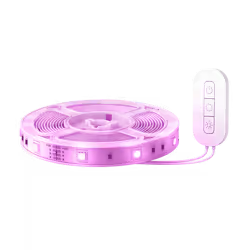
Hello, this is TheTechBoy with this week in TheTechBoy. Vont Smart Lights 16.4 ft Review!     Vont lights 16.4-inch lights impress. They are feature-rich and have great app support. But are these the affordable smart lights you need? 17.99-30.99 dollars Source Vont.com The Hidden Spy Trick in your Android Phone🕵️      Is this a useful trick? Is it legal? (yes it is). Do you have to download an application? Learn more by clicking the link!!   Podcast Download!!

Vont Smart Lights 16.4 ft Review.

Image
     Hello, this is TheTechBoy with a review of the Vont Light Smart Strip 16.4-foot lights. Vont sent me these lights to review honestly.  I tested most of the Vont Home application inside of Secure Folder, but some more advanced features were tested outside of Secure Folder.  Darkened in editing for effect Box Contents:     The lights come in a box that contains one light strip, one alcohol wipe, the power adapter, setup instructions, a mounting kit, and a QR code for the manual. This is preferable to smartphones that include the manual and remove the charger. The power adapter is large, and it can cover two ports instead of one which is not a good thing.  Also, the lights have a buzzing noise that is noticeable when it is plugged in. Fortunately, Vont sent me replacement lights that do not have this issue. I tested the replacement by unrolling the lights, but not sticking them on the wall. I also used these to test what would happen with multi...

The Hidden Spy Trick in your Android Phone🕵️

Image
Hello, this is TheTechBoy with the hidden spy trick in your phone.       Have you ever seen old spy cartoons with someone looking through a newspaper when conducting surveillance on someone? This tutorial will show you the hi-tech way to do this with your Android phone. I have a Samsung A71 5G running One Ui 4 and Android 12, so this may not work on all Android phones.      Step 1: Unlock Phone      First, unlock your phone, then open the camera application. Navigate to the application switcher either by gestures or by clicking the three-lined buttons. Hold the icon and click open in the pop-up view. A faster way to do this would be to open the Apps edge, then click and drag the camera icon into the middle of the screen. Make sure to add the camera to the edge screen before you do this. This will open the application in pop-up view. Thanks to Techisode Tv for showing this trick.      Step 2: Adjust the Camera    ...

This Week in TheTechBoy + Podcast EP 7

Image
Hello, this is TheTechBoy with This Week in TheTechBoy. Support TheTechBoy!! CHROME HAS A BUILT-IN AD-BLOCKER!!      Did you know Chrome has an ad-blocker? In this post, TheTechBoy tells you how to access it, and why Google added it to Chrome. (TheTechBoy is Ad-Free!!)  Samsung Notes vs Xiaomi (Redmi) Note      The battle between Xiaomi and Samsung continues. Will Samsung productivity-focused devices beat the budget devices from Xiaomi? Only time and this post will tell.   On this episode of the podcast, TheTechBoy discussed the Apple event, TheTechBoy Tech awards, Vont, Sony WI-C310 earbuds, TheTechBoy posts, and the Indiegogo campaign!!

CHROME HAS A BUILT-IN AD-BLOCKER!!

Image
Hello, this is TheTechBoy with a Special report. Updated!!  CHROME HAS A BUILT-IN AD-BLOCKER!! In Google Chrome 97 you can enable this ad-blocker in easy steps. 1. Do Ctrl/Cmd shift I to get to inspect. Or two-finger press on the touchpad and click "Inspect." 2. Click the settings icon in the top right corner of the screen.  3. Scroll down until you find the checkbox that says "Force ad blocking on this site." It is in the Network section. This tool only works on that specific site and has to be enabled on all the sites you want to black advertisements. This tool is supposed to be used to prevent bad adverts from appearing and not a substitute for an adblocker.  Why this tool was made? Google understands that some web pages make money by showing ads, and does not want you to block all of them, however, some people have had bad experiences with advertisements and block all of them. Google joined the Coalition for Better Ads which is supposed to help online Advertise...

Samsung Notes vs Xiaomi (Redmi) Note

Image
     Hello, this is TheTechBoy with a Comparison of the Redmi Notes vs Samsung Notes. This is Just for fun these phones target different segments.                                    V.S      Source: Xiaomi and Samsung Free Use. 1. Samsung Note vs Redmi Note:     The Samsung Note was released in October 2011 with 16/32 GB of storage and 1 GB of RAM. It has a 2,500 mAh battery, a 5.3-inch screen, and a stylus. The Redmi Note was released in March of 2014, and it had a 5.5-inch screen, 8GB of storage, and 1/2 GB of RAM. It features a 13 MP camera and a 3,200 mAh battery. Because Xiaomi's phone has a better phone. It has a better camera (megapixels) and battery life. However, Samsung's offering has more storage and a stylus. The Xiaomi processor is also better than Samsung's offering. In conclusion, the Xiaomi phone barely wins.  2. Samsung ...

This Week in TheTechBoy + Podcast Ep 7

Image
Samsung A71 5G v.s S10+      Can the A71 5G beat the S10+ on the virtue of having 5G? Or will the S10+ strike back with its superior featureset. Find out by clicking the link to go to this post.  Exert :               The A71 5G is a midrange smartphone made by Samsung Electronics and released in 2019. The mobile features 128 GB of storage and a Micro-SD card slot, quadruple cameras, and an optical in-screen fingerprint scanner. The handset also has a large 6.7-inch display and a 'glasstic' back. This handset has been tested here at thetechboy.org before and you can read the review here. The Largest Scam on the Internet:     TheTechBoy found a large scam on the Internet. It involves drones and fake reviewers. Find out which websites to avoid and what websites to trust (like thetechboy.org)  Exert:                  Hello, this is TheTechBoy and today I will be expo...

Samsung A71 5G vs S10+

Image
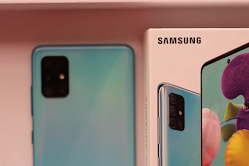
Hello, this is TheTechBoy with a special comparison. Today the A71 5G is being compared to the S10 +      The A71 5G is a midrange smartphone made by Samsung Electronics and released in 2019. The mobile features 128 GB of storage and a  Micro-SD card slot, quadruple cameras, and an optical in-screen fingerprint scanner. The handset also has a large 6.7-inch display and a 'glasstic' back. This handset has been tested here at thetechboy.org before and you can read the review here .      V.S        The S10+ is a flagship smartphone manufactured by Samsung Electronics in 2019, the mobile features a 6.4-inch curved display and a triple camera array. The phone has a 1 TB storage option and can hold a Micro-SD card. The mobile also has a glass back with a ceramic back also being an option.   Camera      The S10+ is a flagship smartphone and has a more versatile camera system. It includes a telephoto and an ultra-w...

Breaking: Largest (Tech) Scam on the Internet.

Image
    Update: On December 31 2022 A person called me and said that they were not involved more evidence is coming:  Hello, this is TheTechBoy and today I will be exposing the major tech scam behind the Shadow X drone aka the SkyQuad, aka the MyQuadair, aka, aka the Air drone, aka the Taticaldrone aka the Nuvom Drone, etc. These companies appear to be a copy of the Eachine 58 drone per this YouTuber who appears to be sponsored by many of these bad actor companies. Advertisements for this drone are linked to Northstar media and Clicarc. (developing)  Per his YouTube Ad, Id he is linked to the USA. These companies appear to have fake reviewers ‘reviewing’ these drones. These fake review companies have links to other fake products, in a scheme more sinister than fake drone knockoffs. I heard about some of these companies in a video I saw here . The Scam:      Digitogy.eu did a review of the drone. However, this less-than-scrupulous network has affiliate ...

This Week in TheTechBoy + Podcast EP 6

Image
Hello all, happy Labor Day. This is the This Week In TheTheTechBoy for last week.  DEPSTECH DS350 Review    This is the  DEPSTECH DS350. It has one camera at the end of its 16.5 ft cable.  Is this Endoscope great value for money? Will the image quality hold up to scrutiny?  Find out in the review linked above.   Alexa and Artemis 1       TheTechBoy will ask Alexa questions during the launch of Artemis 1. The questions will be posted on the website.  Wallpaper links.   Summer Abstract Art

Asking Alexa Questions During Artemis I

Image
     Hello, this is TheTechBoy with a special post. This post will be updated with questions and answers from Alexa onboard Artemis I.  Thanks to @Space X and https://unsplash.com/@grantritchie  Question: 9/3/2022: 

DEPSTECH DS350 Review

Image
Hello, this is TheTechBoy with a review of the DEPSTECH DS350 Industrial Endoscope. DEPSTECH sent me this Endoscope to review.  ​     This Endoscope retail for 70 dollars on the DEPSTECH website . It has 6 LED's around the 1080p camera and a 4.3-inch screen to see the image of the device. The device comes with a charger 32 GB micro SD and a Micro USB charger. It uses the same design as the S350L which causes some issues that I will detail later in this review. Update: It is not dual cmera  Design:      The Endoscope is pretty thick. The angled sides and plastic back kind of remind me of the Samsung S5. On the bottom, there is the Micro SD slot with the included Micro SD card preinstalled. The Micro USB port and reset button are also at the bottom of the phone. Underneath the screen, there are the buttons that control the screen. The screen is okay. It is no Samsung Amoled but it gets the job done.  The screen does not get scratched by m...