Posts

Showing posts from July, 2023

Effortless Article Saving on NotTheBee.com
Image
    Are you eager to save your favorite articles on NotTheBee.com hassle-free? Look no further! Follow these simple steps to bookmark articles with ease. 1. Account Setup:    Before you dive into the world of saved articles, make sure you have an account on NotTheBee.com. If you don't have one yet, sign up quickly and enjoy the benefits of personalized content curation. 2. Bookmarking Made Easy:    When you stumble upon an intriguing article while browsing the site, check out the rightmost side underneath the article's image. You'll spot a handy bookmark bar right there! 3. Click and Save:    A single click on the bookmark bar, and voilà! The article will be magically saved to your account's bookmarks, ready to be revisited whenever you desire. 4. Accessing Your Bookmarks:    To access your treasure trove of saved articles, locate the three-line layout menu (often referred to as the "hamburger menu") and give it a tap. Scroll down, and y...

Samsung Event Liveblog

Image
Hello, this is TheTechBoy with a Samsung Live Bloh Larger Z Fold 5 Cover display Ok its like a fashion accessory No telephoto sad, Who cares about 'selfies' that much I just noticed the front screen on the Z fip looks like the notch on the Original Fold.  Why notifications on the side?  Oh nice its has a Snapdragon 8 Gen 2. The hinge looks gap free Oh nice here is the Z fold So its a Z fold 4 with  new chip  1,750 Nit screen making it brighter than an S23 Ultra  I like that S pen case Here we gooo Watch 6 is out Seep Coaching  Oh Meditation I wonder what Michel Knowles thinks It has a temp sensor Decent prices Tab S9. I asked a chat support agent if it had MicroSd and she did not know The lady was editing a video in Luma Fusion Wooo Water resistant tablet Goodnotes looks fun They are going for an artsy feel Nobody cares about your 'footprint' And it is done

Sponsored: Jiveworld Review

Image
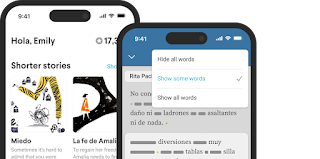
Hello, this is TheTechBoy with a special review.  Source:Jiveworld Jiveworld is a language learning platform, available on the web or in app form, that uses stories from across Latin America to  teach intermediate and above Spanish learners  how the language is really spoken. I was able to understand some of the stories, but since I'm a beginner, I heavily used the transcript and translation options to read the passages in English.     The patented Jiveworld player gives you vocabulary and idiomatic translations, but also offers two modes to match your progress. Study Mode shows all the words in the transcript, while Natural Listen Mode hides them so you can focus on listening. You can also change the speed of the audio playing to slow it down or speed it up as you get more familiar with the language.  I saw a new feature being teased out - looks like some kind of mini-stories are launching soon.  You can download Jiveworld for Android o...

Plays.org Review

Image
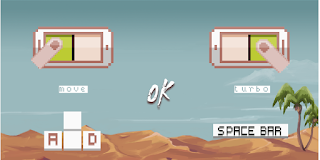
Hello, this is TheTechBoy with a review. Plays.org compensated me for this article.       Plays.org is an online gaming service that lets you play simple 2D games. I will provide a unique perspective as a non-gamer. I briefly skimmed through the catalog, and most of the games were pixelated 'retro style.'       I'm not sure if that is a current trend or if it is to reduce the load on the server (Retro Bowl is popular, so I wouldn't doubt it). I found a game called 'Deep Worm' that looked like it had the best graphics. A setup screen showed me how to play the game, and I was ready to start. The entire premise of the game is to attack the military above ground and blow up their trucks and soldiers without getting shot. Getting shot causes you to lose a life. The keyboard controls are kind of complex for a first-time gamer, but the touch controls are alright.       I finally figured out that you are supposed to use 'A' and 'D' key...

Websites > Mobile Apps.

Image
 Hello, this is TheTechBoy with a Hot Take. Websites > Mobile Apps.     I'm not saying that applications are bad, and they some are actually good (ex. YouTube, Zoho app) platforms that are application only are not great.      Meta recently launched Threads and it is application only for now. They could benefit from launching a website that would potentially target desktop and tablet users. This is not good for growth as you loose out on an entire network of people who could benefit from your service.     Another example of this is Instagram. Sure you can search basically on Instagram butore advanced searvhes via octothorpe (hashtags) and location have to be handled via theobile application, potentially forcing Social Media managers to use their phone for everything.    Lastly, Twitter limits functionality on the mobile website. You cannot record a Space without an application. Leaving thousands of desktop users out who have potential...

Seeing 'M' At the End Of Questions This is Why!!

Image
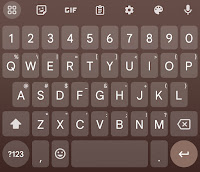
Hello, this is TheTechBoy with a special article.     If someone is asking a question on the internet, you may see something along these lines: "Why do I have to eatm"    The reason for this is that on smartphones or touch Windows keyboards using the QWERTY layout, the 'M' key has to be pressed for the '?' to pop up. On Gboard, the default time for the system to detect a key press is 300ms. On other keyboards, it may be higher or lower.    Depending on the speed of the typist or the importance of the message, they may have left the 'M' key in, whether intentionally or unintentionally. God Bless, and Tech Talk To You Later 

Chrome launches a reader mode button.

Image
    Hello, This is TheTechBoy, and I have some exciting news to share with you regarding a feature added to the Chrome mobile application.  Click that button.         A new feature has been added that allows users to switch websites to reader mode effortlessly. Let me guide you through the process: Step 1: Open the Chrome application on your mobile device and navigate to the desired website. Step 2: Look near the address bar for an icon resembling a cell phone. Tap on this icon to activate the reader mode. Step 3: Please note that the page may load as insecure, but don't worry, as it will still strip away all advertisements. Step 4: It's important to mention that this feature may currently have some limitations and may not work on all pages flawlessly. God bless and Tech Talk To You Later!!!

Nothing Phone 2 Live Blog

Image
Hello, this is TheTechBoy with a live blog of the nothing phone. 10:03 CST it's starting  Let's see if the guy is wearing an Apple watch Make Tech Fun Again MTFA They are driving to meet Casey This is one of the dumbest launch events ever. Why on earth are they on a roller coaster cursing. Finally they are showing the phone .  Curved back looks like flat sides. Give me some specs. Your phone is not interesting on a roller coaster. You have done nothing different having lights to a back of a phone. I'm not going to buy a phone to quote on quote support a small team. No telephoto camera probably a mid-range chip the price better be good. My school has those 3D printers Interesting They have some app optimization for the glyph interface finally It has a 50 megapixel camera

How to Access Special Characters on Samsung Keyboard

Image
    Learn how to easily access special characters, such as -&_, on the Samsung Keyboard by following these simple steps.     Step 1: Accessing Keyboard Settings To begin, locate the gear-shaped icon on the Samsung Keyboard. If you cannot find it, open the phone's Settings application and search for "keyboard settings" to access it.      Step 2: Enabling Alternative Keyboard Layout    Once you are in the Keyboard settings, click on the "Layout" button. Then, select the "Alternative Keyboard" option. By enabling this setting, you will be able to access special characters easily. Conclusion:     By following these two steps, you can effortlessly access special characters like -&_ on your Samsung Keyboard. This feature will enhance your typing experience and save you time. God Bless, and Tech Talk To You Later!!!

This Week In TheTechBoy Live: 7/1/23

Image