Posts

Showing posts from September, 2023

How To Share God's Word With Bible Gateway

Image
Hello, this is TheTechBoy with a special article. To find out why we do these articles click here .  We believe that a relationship with Christ is the most important decision you can make in your life. How to share a Bible verse from Bible Gateway.com.   1. Find Your Verse     Go to biblegateway.com and pick the verse you want to share.  2. Click The Share Button     This button looks like an arrow (left of speaker). This will open the share menu.  3. Click Twitter, Facebook, Or Email.     If you decide to send it via Twitter (X) click the bird button and it will open an external window that will compose the Tweet/post for you if you are logged in. If you are logged out then it will make you log in and then send the tweet/post. This is the same for Facebook as well.        For email, it will open a window that will let you put your email address in  and the email you are sending it to, click an I am not a r...

How To Embed A Verse Of The Day To Your Website

Image
Hello, this is TheTechBoy with a special post.       On our website, we have a verse of the day widget embedded so people can read a Bible verse and see a salvation message. We believe that a relationship with Christ is the most important decision you can make in your life.  If you have a website and want to embed this code into your site this is how.  1. Open the HTML editor of your website.  2. Go to biblegateway.com/usage/ and scroll down to HTML code (there are other sharing options as well if you want to check it out). Click find out more, or click this link  to take you there directly.  3. Choose your Bible version then copy the below html code. Past this code into your website's HTML editor. The verse will be updated daily without any input from your side. 4. Publish the page on your website. You can even include a salvation message on the page. To see what our page looks like, and to see the salvation message, click here . ...

Epieos Review

Image
   Hello, I'm TheTechBoy, and I've got an exclusive review for you. A few weeks ago, we discussed Epieos on our podcast, which is an OSINT tool designed for searching someone's email or phone number. TheTechBoy Media reached out to the company, and they generously provided me with 30 free credits to put their service to the test, and I must say, it's remarkably robust.      Epieos boasts an impressive range of capabilities. It can determine if someone is currently active on chess.com, retrieve archived Google Plus posts (accessible via the Wayback Machine), perform checks on haveIbeenpwned to identify potential account breaches and utilize Holehe (a free tool available for download on Kali Linux) to locate accounts associated with your name. Furthermore, the software extends its reach to platforms like Duolingo, Strava, Flickr, and Trello. However, it's worth noting that it encounters difficulties when dealing with phone numbers, so it's advisable to deactivate ...

5 Things Apple 'Addded' to the iPhone 15 that we have had for a long time.

Image
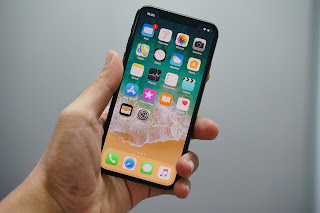
Hello, this is TheTechBoy with a special article. 1. USB C     Since 2016 Android phones have had USB C. Now Apple can use the same cable that your 7-year-old phone used!!! It still can't do what my great grandmother's Android-based flip-phone (with no internet) can do though....access the filesystem via cable. 2. Zoom     Apple added this to the iPhone 15 Pro Max. Samsung has a 3x and a 10x optical on its S22 and S23 Ultra. Get Better Apple..or don't. Really you do not have to... 3. Dynamic Island     The LG V20 had a true  notch type dual screen...in 2016. 4.    60 HZ Screen     No 120 hz upgrade on the base 800-dollar iPhone? Are you kidding me? That the same refresh rate as Samsung's Glaxay S7 Edge from ...2016...which was cheaper when it launched than the iPhone 15.... 5. Portrait Mode In Pictures          Sure Apples may be more advanced, but I can turn my photos into portraits on my galaxy S22 Pl...

Podcast Episodes

Image
 

How to add a drawing to Samsung Notes.

Image
How to add a drawing to Samsung Notes.  I know it is an iPad I found this feature accidentally it just appeared on my screen when I pulled it out of my pocket and could not wait to share it with you. 1. Let's kick things off by launching Samsung Notes. Once you're in the app, go ahead and create a brand-new note. Remember, we're not going to doodle on the screen this time; we're diving into some more advanced drawing techniques. 2. Now, look for the trusty paperclip icon within the app's interface. Once you spot it, give it a satisfying click. After that, you'll see an option that says "insert drawing." Click on that. 3. Now, it's time to unleash your inner artist! Get creative and start drawing to your heart's content. Feel free to experiment with different brush styles, mix up some vibrant colors, and explore all the cool features that this advanced drawing function has to offer. Most importantly, have a blast while you're at it! Happy dr...

Apple Cant Get Away With This

Image
    The iPhone 15 only has two cameras and a 60 Hz display! Why is this acceptable? The Pixel 6a got criticized for not having a 60 Hz display (which is a valid criticism). The iPhone 15 is more expensive, and Apple still won't include a feature that's on Samsung's A54. This is terrible in terms of specs, and only Apple seems to get away with it.      Apple did increase the resolution of its cameras to 48 MP, which means it gets 2x 'lossless' zoom with no optical telephoto camera, but any zoom beyond that is purely digital. Samsung's S21 had a 3x zoom camera, for goodness sake! I understand that Apple wants to differentiate between the regular and Pro series, but this is unacceptable. I wouldn't want this in a similarly priced Android phone (with one exception, the Asus Zenfone due to size constraints). Apple should not be allowed to get away with this. What do you think? Will Apple get away with this, or will they face criticism? God bless and Tech Talk To ...

Thank You Brett Cooper For Stealing My Job

Image
     Hello all. Everyone's second favorite Gen Z YouTuber decided to pivot into the tech space.  And I reacted and I went VIRAL!!!...ish anyway this will become a new series.                                                Thank You, Brett Cooper!!! God bless and Brett Talk To You Later!!!

Apple Event Live

Image

Teenage Chat Trends Are Kinda Weird

Image
Hello, this is TheTechBoy with a special article. Hey, look a green bubble. Photo by Volodymyr Hryshchenko on Unsplash        At my school, I have noticed that teenagers use Snapchat to communicate with each other; some use Instagram, and even some use TikTok (which is insanely weird when you think about it). This begs the question: why?      Why are social media applications being used to chat with friends when SMS is free? Why are they not using dedicated WiFi-based chat applications such as WhatsApp, Telegram, or Signal? It is not because a phone call is intimate; Instagram and Snapchat allow you to call people. It is not for security reasons, as Snapchat is not end-to-end encrypted (and messages can be viewed on any device, unlike SMS), and I doubt the teens are worried about SS7-based tracking...      One actual messaging application has broken through to teens, but it costs 1000 dollars to enter and can be hard to leave. Of course...

Samsung's Voice Typing Needs to Get Better

Image
Hello, this is TheTechBoy with a special report. Samsung's voice typing is subpar. I tried using it due to its offline mode, but I couldn't continue. It is highly inaccurate on Samsung's keyboard. Fortunately, Samsung allows you to switch to Google's voice typing on its keyboard. Here are a few examples of Samsung's typing. Hello, in welcome to the this week. In the Tech boy podcast. (Bad it should be and welcome to (no period by week) Samsung is better than iPhone. (10/10 even spells iPhone correctly.) I like cheesecrackers. (Should be a space) And here are a few examples of Google's typing. Hello, and welcome to the this week in the tech boy podcast. 9/10 Samsung gets better than iphone. Gets us supposed to be is and iphone should be iPhone. I like cheese crackers. Perfect    In order to change the voice typing settings, click the gear icon and scroll down to voice input. Then, select Google for voice input. If you ever need to type offline, then I guess you c...

Boogie Board Blackboard Review

Image
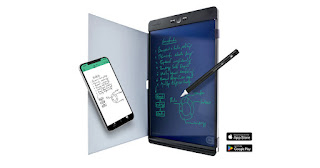
Hello, this is TheTechBoy with a review of the Boogie Board Blackboard.      The Boogie Board Blackboard is an interesting concept. A Boogie Board is essentially a whiteboard that can erase instantaneously. However, this one is special because it comes with inserts that allow you to use it as a notebook, graph paper, just a black screen, etc. The inserts also enable you to trace over images and scan them with your phone using the Blackboard application.      The pen is better than a regular Boogie Board's pen. It is more round and attaches to a magnetic strip at the bottom of the device (yes, the button is at the top). This pen also has an eraser that needs to be calibrated to erase. The board is somewhat pressure-sensitive with about two pressure-sensitive settings: thin and regular.      The eraser is okay at best. You activate it by holding down a side button and using the eraser. Sometimes it works, but it also presses down on the screen ...