Posts

Showing posts from February, 2024

Gemini Has A Problem: It's not the One You Are Thinking About

Image
     Hello, this is TheTechBoy with a special review. Google's AI chatbot 'Gemini' has been the news recently and it's not good news. However, it has another problem, a personality problem.       Right now, Gemini can be used as the default voice assistant on your Android phone. This could replace Google Assistant as your default voice assistant. Gemini is way smarter and more advanced than Google Assistant, but it lacks one thing, personality.      If you were to ask the dumber Google Assistant its favorite food it would answer you. However, if you ask Gemini, it would tell you that as an AI language model, it doesn't have personal preferences. This is a major problem. One of the main features of voice assistants and smart speakers, is their fun 'person-like' personality.  You can ask Alexa to sing for you, Google will tell you fun facts about itself, and sing songs, Cortana (RIP) and Bixby do the same. This is what gives the assis...

I Made My Hacking Search Engine!!

     Hello, this is TheTechBoy with a special announcement!!! We did it!! Last week on the podcast I expressed a desire for a hacking forward search engine and I am pleased to announce our first draft. It is programmed to search Youtube and a various collection of hacking sites, Reddit, and some osint websites.     The site is here . If any site owners want to ass their site to the list please contact me so I can add it to the search engine. Happy hacking!! God bless and Tech Talk ToYou Later!!!

This Week In TheTechBoy Podcast 2/17/24

Image

How To Find Computers Connected To TELNET with Zoom Eye!!!

Image
Hello, this is TheTechBoy with a special article.      ZoomEye is like Shodan but cheaper. It is a Chinese website so I would be careful with the data and accounts you use it to test on and the map is very laggy (and in Chinese) but it can still be used to find open systems. I have used it to find webcams, computers running RDP, and telnet. As always be careful and don't do anything illegal.      First, go to Zoom Eye. Then use the search bar to search for what you want. If you want to find a computer accessible via telnet, type port:23. You can narrow your search by specifying the os by typing os:Vista. To specify the location you can either click the country on the right-hand panel or use a search command such as, country:"US" city:"Houston" To connect to the comouters you need to use the telnet client. China has thousands of remote Windows XP computers connected to the internet!!! The UN even has some financial computers running Windows 98!!! — TheTechBo...

Great American Family Teases New Mystery

Image
Hello, this is TheTechBoy with a special article.      Great American Family star, 'Candace Cameron Bure' teased a new mystery coming to the network on Allie Beth Stuckey's podcast today. The media company broadcasts its shows on cable networks around the country.     Great American Family also has a majority stake in Pureflix with the new name ' Great American Pure Flix.' Pureflix is a Christian streaming network, akin to Hulu or Netflix. It appears the content Great American Family produces will also be available on the streaming network.  God bless and Tech Talk To You Later!!!

How To Change Someone's Shirt With AI: Adobe Firefly

Image
     If you have ever wanted to change someone's shirt, add jewelry, or a jersey. you can do this on Adobe Firefly using the generative fill. You can upload your own image or use one of the stock images Adobe provides.       First, go to this link .  Next, you may upload your image using the box at the top. After doing that, click the button that says 'insert' and paint over what you want to change.  When you do this what you 'paint' over will change to a checkered background then a text box will appear.     Type what you want into the box. The lady's jacket in my picture is orange and I want it to be blue with drones on it. So I would type 'a blue shirt with drones oon it.'    After a few seconds, it will generate three options that you may select. You have the option to choose more. If you don't like it you can click cancel change the paint and your prompt. If you want to change the size of your brush touch the setting b...

How to Activate The Built In OCR: Windows 11

Image
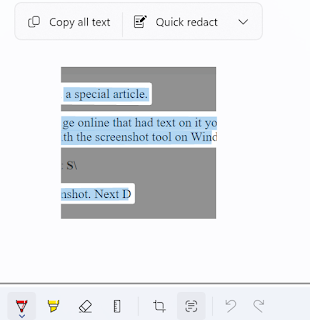
Hello, this is TheTechBoy with a special article.      If you have ever seen an image online that had text on it you may have wanted to extract the text. Usually, you had to use an OCR tool but this tool is built in. Today I will show you how to do it with the screenshot tool on Windows 11.       First, press Windows key Shift S. This will activate your screenshot. Next, draw a box to take your screenshot. Finally, click the snipping icon that pops up.  When you click this you will see a  square button next to the crop button. When you hover over it, it should say 'Text Actions.'      Click this button. It will think for a few seconds and highlight the text. You can copy all the text or just highlight the text you want. God bless and Tech Talk To You Later!!!