Posts

Showing posts from January, 2025

The Worst Scam On The Internet

Image
Hello, this is TheTechBoy with a special article. Common scams people in the alt-tech/conspiracy theory space can fall for. From overpriced "freedom" phones running "banned" apps due to "censorship" by Big Tech and the "deep state" to overpriced software and health scams, there is plenty to look out for on the internet. However, one of the biggest scams, not because of its potential danger, but its insane profit margins, is the EMF scam. People believe that radio waves, like those from microwaves, satellites, metal detectors, and cell phones, are filled with rays that can affect them. Sometimes they believe these rays can "control minds," "start fires," or "give cancer." Obviously, this is false (sorry, crunchy/conspiracy readers). Nonetheless, these companies prey on innocent people by selling stickers that cost a penny and sell them for an 80,000% markup. These stickers do nothing. They cannot block rays and are o...

Google Maps Set To CHANGE Gulf of Mexico to Gulf of America

Image
Hello, this is TheTechBoy with a special article.    Google announced that it will rename the Gulf of Mexico the Gulf of America after the official United States database, the GNIS, updates its name.      This change will also affect Mount Denali, the US's highest mountain, which will be re-re-named Mt. McKinley in the United States. In other countries, the change will show with both names side by side. God bless and Tech Talk To You Later!

TheTechBoy Launches Reddit Alternative

Image
Hello, this is TheTechBoy with a special report.      In the podcast episode, "Kids Are Like Weeds," I announced the creation of the new Christian social site NotTheBoy.com . We are happy to announce that the site is growing and changing for the better.      Users have risen due to its branding, moving away from being a competitor site to other popular Christian social media sites and becoming an alternative to Reddit in response to the "power mods" banning X links to Reddit due to "facism."         NotTheBoy is now introducing groups, including Christianity, sports, technology, and more. More groups are beinng added and X links will, of course, be allowed, and teens are allowed. Registration is free for now! God bless, and let us become the largest Christian social media site on the planet!

This Is A Disgrace

Image
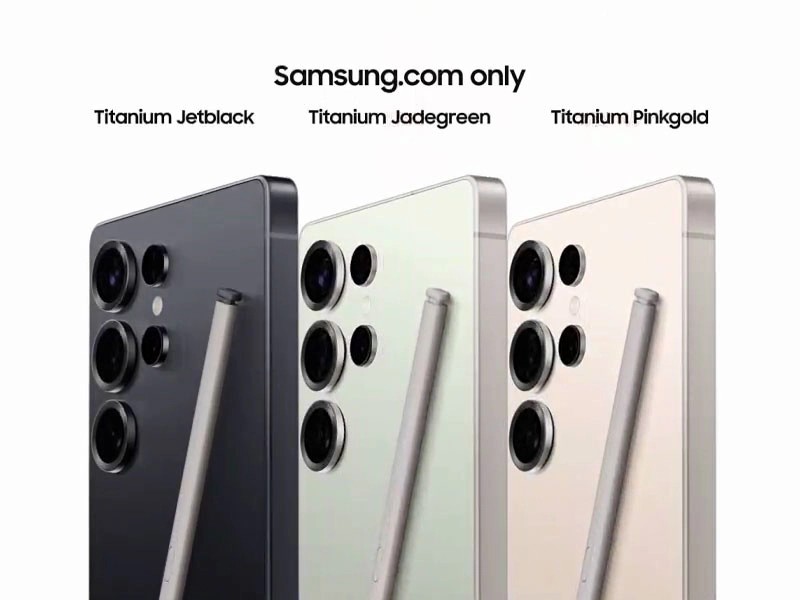
     Samsung did it again, removing features from devices.       The S25 Ultra launched to much fanfare on Wednesday. However, one thing was missing: the S-pen. Now, before I go too far, the S-pen is still in the phone and it has an all-new design, which is nice. But it did lose a key feature, Bluetooth functionality. On phones like this before, it was able to pair with the device, and you were able to control the screen without touching it using the S-pen. No more; you have to touch the screen to use the phone. This is disgraceful. Samsung should have kept the feature even if it cost a few more cents.         The more important feature that is missing is also a remote camera shutter. Yes, Samsung says that they have other features that can do this, like the Galaxy Ring and Galaxy Watch, but those cost upwards of $200. When the S-pen is essentially free when it comes to your phone, this is terrible.         And a...

Samsung Unpacked!!

Image
    Hello, this is TheTechBoy with a special live blog!! Samsung Unpacked is today and the S25 series will be launching. Before we get anywhere, I would like to thank Vidnoz my affiliate partner. Check them out here . Buying supports the channel!!    Google Gemeni got mentioned as well as multi moldal Ai. Hopefully it will work offline. 12:05 Nice, Gemini will be able to see what is on your screen and camera!! They are also pushing glasses and screens. 12:06 All the edges are curved on the bezel. No mire sharp corners. The S25 is now an Ai companion.  12:07 Nice personalized Ai data will be stored offline. And a new NPU chip. 12:13 Galaxy Ai and now bar can show data like maps and sports updates. 12:17 has Samsung fixed the magic select tool? 12:17 Samsung is also showing the Google Messages app.  12:18 wow search got so much better!! Let's gooo!! 12:20 circle to search got better 12:22 Samsung just showed the Chrome browser on screen.  12:25 this is ...

How To Change Your Voice On Samsung Phones: NO ADS!!

Image
Hello, this is TheTechBoy with a special article.        Did you know that Samsung phones have a 1st party voice changer? It's ad-free and will work with system-level applications such as the voice recorder and camera, so be careful that you don't record anything important in this mode. Download Good Lock if you do not already have it. If you have it, you need to download the Sound Assistant module in the "Life Up" section. Don't worry, One UI 7 beta users, it works here as well.      Secondly, open this module and scroll all the way down to where it says "voice changer." Toggle the switch on. After toggling it, tap the settings. You will see a few pre-made options, but now you can make your own.      Tap that option and play with the settings. If you are ever recording something and you forgot to turn it off, a little notification at the bottom of the screen will show that it's in use so you can turn it off. God bless, and tech talk to ...

How To Time Travel With A Computer

Image
Hello, this is TheTechBoy with a special article. When doing internet research, you may want to see what people were saying in the past. This can help you find news articles in the past or information that would be harder to find in today's SEO-optimized culture. This is how you do it. 1. Open Google.com. On the top right, there will be a bar that says "Tools"; touch it. On mobile, you will have to enable desktop mode to get the full use of this feature. 2. After tapping it, on the top left, there will be a bar that says "Time." Click that. 3. Select "Custom range" and type in the date or year you want the search to start and end. This will only show articles published in that time. You may have to scroll down a bit, though, because sometimes publishers assign dates to articles for SEO (searching "iPhone" in 2004 will sometimes show ads for the 2024 iPhone 16). God bless and Tech Talk To You Later!!

How To Customize The Edge Panel On Samsung Devices!!

Image
Hello, this is TheTechBoy with a special article.      Edge Panel used to be one of Samsung’s standout features. While many phones now have similar options, you can still customize your Samsung Edge Panel to stand out with a different color in just a few simple steps! Open Settings and type Display in the search bar. Find and toggle on Edge Panels , then tap on it. Once you’re in, tap on Handle . Here, you can change the color of your Edge Panel, as well as adjust its size, position, and transparency! God bless, and Tech Talk To You Later!

How To GENERATE Secure Passwords OFFLINE on Android!!

Image
     In today's digital age, secure passwords are more critical than ever. They act as the first line of defense in protecting your personal information, financial accounts, and sensitive data from cybercriminals. Weak or easily guessable passwords leave your accounts vulnerable to hacking, identity theft, and unauthorized access. As online threats continue to evolve, ensuring your passwords are strong, unique, and unpredictable is essential to safeguarding your digital life. A secure password not only protects your accounts but also provides peace of mind, knowing your private information is safe from prying eyes.      If you want to generate secure passwords offline directly on your phone, download this Password Generator Application. The download link is provided here . This app offers multiple customization options, has no ads, and works quickly and offline. To get started, download and launch the application. The main screen features checkboxes that ...

How To Eanble Developer Mode On Android

Image
Unlocking Developer Mode on your Android device grants access to advanced settings that can enhance your smartphone experience. However, enabling these features can introduce security vulnerabilities, so proceed cautiously. Here's how to activate Developer Mode on your Android phone: Access About Phone : Open the Settings app. Scroll down and select About Phone . If you do this a lot on a Samsung phone, you can do more  if you want. Enable Developer Mode : Tap Software Information . Locate Build Number and tap it seven times consecutively. When prompted, enter your device's password or PIN. Access Developer Options : Return to the main Settings menu. Scroll down to find Developer Options listed as a new entry.      Once activated, Developer Mode offers various settings, such as adjusting animation scales to make your device feel faster. For instance, reducing the Window , Transition , and Animator animation scales from "1x" to "0.5x" can enhance the per...

OnePlus 13 Relaesed

Image
     OnePlus recently launched the OnePlus 13, which is priced at $899 for the model with 12 GB of RAM and 256 GB of storage. Interestingly, the 16 GB RAM/512 GB storage version also retails for the same $899.      In terms of specifications, this phone is among the most high-end devices on the market. It features a 6000 mAh battery, which, according to MKBHD, is impressive enough to last a full day. This marks a significant improvement over phones like the Samsung Galaxy S24 Ultra, which, in my experience, typically last only half a day. As for AI, the OnePlus 13 comes equipped with Google Gemini, AI Unblur, and AI-powered photo and note-taking capabilities.      The phone is powered by the new Snapdragon 8 Gen 3 Mobile chip, which is expected to deliver better power efficiency and enhanced processing capabilities. However, new applications tailored to the chip have yet to be developed. As I’ve mentioned multiple times on my podcast, most ...

Get Better Smart Select!!

Image
      When Samsung unveiled its new AI-based screenshot feature, I was very excited. It could pick the shape, extract text, and even, in a later update, record GIFs. However, the old screenshot taker was more stable.       For instance, if I want to screenshot something with words, the AI in it would detect the text and try to copy and paste it. This can be useful sometimes, but most of the time I want the screenshot. I have to select something that doesn't have text and then expand from there.        Secondly, the shapes option is gone. It's only squares and rectangles. No circles or triangles. This is unacceptable. Sure, you could edit it, but on-device it would be so much better.       Lastly, it's slow; it takes a long time to load and is sometimes glitchy. If Samsung can fix this, the AI screenshot would be the best ever! God bless and Tech Talk To You Later!!

How to Search for Songs Playing On Your Device.

Image
Hello, this is TheTechBoy with a special review.       Finally! We have a song search app for music playing on your phone's screen. You can use a circle to search on Android. 1. First, hold down the home button while music is playing on the screen. Then, click the music button next to it.       2. A graphic will appear, and you will see that you can detect the song! It will then open the link go the song in another browser. God bless and Tech Talk to You later!!   Tech it out (affiliate)