Posts

Showing posts from May, 2025

The Web Is Dead 😭:Pocket

Image
Hello, this is TheTechBoy with a special article.                Mozilla announced that Pocket, the web aggregator, is shutting down. This is devastating. Pocket wasn’t just a tool to save articles for later; it curated stories tailored to your interests—news, science, tech, lifestyle—all in one app. Unlike newsfeed apps like CNN, THM, or The Hill, which pull from limited sources, or apps like Citizen, Samsung News, or SmartNews, which aggregate from multiple outlets, Pocket offered a unique blend of diverse, high-quality content.         This is heartbreaking. Pocket was one of my favorite apps, and its loss leaves us with fewer options beyond scrolling social media or shopping on our phones. Reading, especially long-form content, is good for you, but how can you read if you can’t find the content? Pocket recommended articles I wouldn’t have searched for but loved reading. No other aggregator does this. The web is flooded with...

Woodlands Vlog

Image

Samsung Unveils The Premiere 5: Projector Transforms Surfaces into Massive Home Touchscreens

Image
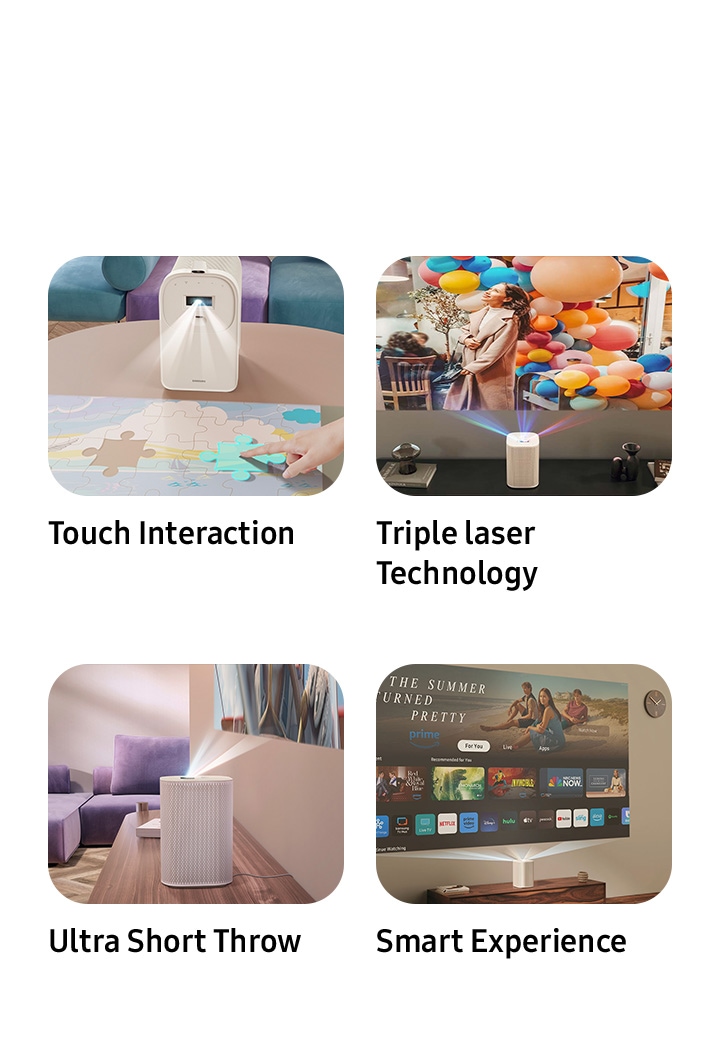
Hello, this is TheTechBoy with Samsung press release. SEOUL, South Korea – May 22, 2025– Samsung Electronics today announced The Premiere 5, a revolutionary projector poised to redefine home entertainment by transforming everyday surfaces like floors and tables into interactive touchscreens. The new device combines ultra-short throw technology with advanced touch capabilities, offering users a versatile and immersive experience, from a 100-inch cinematic display on a wall to a 40-inch interactive surface at their fingertips. "Expanding the projection surface naturally broadens the range of use,” said Jaeyoung Park of Samsung's Visual Display Business, highlighting the core innovation behind The Premiere 5. The compact, "ultra cute" projector utilizes cutting-edge triple laser technology to deliver vivid, pure color images. Its ultra-short throw capabilities mean it can project a massive 100-inch screen from just 17 inches away from a wall, minimizing shadow interfere...

B...based GEMENI!!!?

Image
Google's Gemini can now generate images of people!      After over a year of waiting (at least for me), Google's Gemini can generate images of people. It seems easy to use and less censored than Photoleap, as well as higher quality than X's Grom. However, it is not the best and lacks some features, such as face swapping natively in the mobile application. Images used with Gemeni will be tagged on @theavaharper on Instagram!!         However, I look forward to seeing where this development goes. Gos bless and Tech Talk To You Later!! 

NotebookLM Comes To Android!!!

Image
     Finally! Google Notebook LM is an app on Android. Last year, I gave it 'Tech Product of the Year' because of its sheer usefulness. It allowed me to ask questions about SSALTW, import my own PDFs and data, and ask questions about one specific site and not billions and billions of sites like ChatGPT.   The mobile application is on Android and iOS and is free to use for now. This is one of Google's coolest products, and I hope it doesn't go the way of the Google Graveyard or have exorbitant pricing schemes once the AI bubble dries up.

The ONE Thing RUINING The Internet!!!

Image
THIS one (ok, maybe two) things that are RUINING the internet!!      As you all know, it is my belief that computers and tech are dead. No new applications have really been made, and in some cases, we have regressed by placing everything on the Internet, making technological progress useless. Nonetheless, the Internet is a great invention, especially if you can find the few good sites out there.       However, when I want to find something that’s common but ‘niche’ at the same time, the Internet is AWFUL!! For instance, I was trying to find some information on PBX systems and how the phones ‘know’ what button you pushed to get a phone tree to activate and to play a ‘please hold’ message. Instead of giving me the invention of these systems or information on how they worked and the progression of software, I got ‘ads.’ Not the Google search ads, but SEO-optimized corporate blogs that went like: In the 1800s, the phone was invented, and a rudimentary swit...

S25 Edge?

Image
I am usually a consistent person, but this phone is interesting.      I have long been against the Z Flip series, calling it an expensive pocket mirror , as it would be a midrange device if it were a non-flip phone. So why am I conflicted about the S25 Edge?       At first glance, the Edge is a total scam. No telephoto lens, smaller battery, plus the S25 Ultra's price tag? Not to mention the S25 Ultra is pretty light, 20 grams lighter than my S24 Ultra. And, no Edge screen, like all other Edge devices before it (S7 Edge), for instance. All the removed features in the pursuit of thinness...which is not even a virtue, and by all accounts, the S25 Plus is the better buy.        However, if this were a tad less expensive and turned into its own line, it would be genius. Before Samsung killed the J budget/midrange line, the A series was Samsung's experimental phone line. The A9 was the first phone with 4 cameras, the A80 had a neat pop-up fli...

How to convert videos on Android offline!

Image
       As you all know, I believe web apps have ruined technological progress, making powerful computers essentially dumb terminals for a server somewhere. That is why I am ecstatic to show you how you can do this offline on Android.      Using the mobile application Video Converter . You can convert videos to different formats simply by opening the application and clicking video converter. This will let you select the videos you want to convert. To convert to a new format, select the format and choose what you want to convert it to. Next, click done, and it will start converting. To convert videos to audio, go back and click video to audio converter. This application has many other features as well, such as video slow motion, cutter, and joiner, all for free. If you pay, there is a compress option, and it will remove ads. If you want to download YouTube Transcripts in BULK click here !!  God bless and Tech Talk To You Later!

How to Set Perplexity as Your Default Assistant on a Samsung Phone: PERFECT FOR AI INFLUENCERS!!

Image
How to Set Perplexity as Your Default Assistant on a Samsung Phone           If you want to change the default assistant on your Android phone from Gemini to another option, such as Perplexity or Samsung's Bixby, here's how to do it on a Samsung device. This is useful if you have another AI application like Perplexity and want to access it quickly on your screen. It can also be helpful for running an AI influencer account, where you might want to emulate real-life people's outfits or create prompts based on them, as shown in this video.      Ensure Perplexity is installed on your device. Then, go to Settings and type "assistant" in the search bar. This will appear under Display . Scroll to the bottom where it says Default Digital Assistant App and toggle it on. This will display the available assistant options. Select Perplexity . Now, you can swipe on the screen to bring up Perplexity while still keeping Circle to Search active. To describ...

How to take neat ASCII pictures on a phone.

Image
How to take neat ASCII pictures on a phone. If you ever want to obscure an image or give it a cool style, you can use this app to do it. After downloading it from the playstore or as an APK, Give it its permissions and flip your phone into landscape mode. The phone will open with color ASCII, but if you want different styles, click the multi colored button. If you want to take a selfie, click this button to flip the camera around. When you are ready to capture your shot, click the blue button to take the snap. However, this app doesn't work on extra camera lenses you may have, like telephoto and ultra-wide, thus click the A icon to import your picture. This application will save photos in the gallery application. God bless and Tech Talk To You Later!!

How To Download YouTube Transcript In BULK!!!

Image
      Downloading transcripts from YouTube videos can be a hassle. Ad-heavy websites, costly bulk downloaders, and unsafe software make the process frustrating. Manually copying transcripts might work for one or two videos, but what about an entire playlist? That's where YouTube Transcript Downloader comes in.      I developed PC-based software that lets you use a free YouTube API key (available here ) to extract transcripts from a YouTube video or playlist. It works with English-language videos that have YouTube closed captioning enabled.      The software is currently in beta, so please report any glitches you encounter. It's on sale today for $0.99, and after launch, it will retail for $4.99. DOWNLOAD!!!

Auto Decrypt Caesar Cipher on Android!!

Image
Hello, this is TheTechBoy with a special article.      As part of our spy series, you may want to decrypt some codes. In this article, I will show you how to use the auto-decrypt function of the Caesar Cipher app on Android. First, ensure the app is installed and ready to use. When you open it, click the settings gear and check that your language is selected and the correct alphabet is set.      Import your cipher into the first box and make sure the auto button is selected. Within a few seconds, the text should auto-decrypt! This application is amazing, and I wish it worked on PC! God bless, and UIFUFDICPZ JT UIF CFTU!!

How To Make A Spinning 3d Earth Background In ArcGIS Earth

Image
     Hello, this is TheTechBoy with a follow-up to our article " How to Build a Spy Base ." Today, I’ll show you how to make a spinning Earth background in ArcGIS Earth. 1. Open ArcGIS Earth and click the movie icon at the top of the screen. This will open a mini video editing interface where you can start keyframing.      Next, rotate and skew the Earth. Have fun with it! Tilt it and point it at the continent you want it to start on. Once you have it positioned, come back to this article. Now, look at the timeline and select the "rotate" option. Click on it, and in the corner, you’ll see some settings. Choose "orbit" mode, set it to 360 degrees, and select your desired speed.      When you’re done, click play. If you choose "normal" speed, a full rotation will take about 20 seconds. For a continuous, smooth loop, you will have to edit the last few seconds of the video off in a seperate video editor.       Once the video i...

How To Build A (Mostly) Offline Spy Base!!! Pt 1

Image
Hello, this is TheTechBoy with a special article.      The decline in imaginative play and espionage skills among youth is notable, with technology use often limited to scrolling social media like TikTok or Instagram. Basic technologies, such as radio-based communication or dial-up computer linking, have faded, overshadowed by internet-based solutions. Building a spy base can revive interest in these technologies. This guide outlines the hardware and software needed to create a communications, intelligence, and analysis hub, prioritizing offline functionality and security. Future articles will go into more software detail.       To start, you’ll need a phone, home internet (for initial setup), and a laptop or desktop PC running Windows. Extras you may wan include TV's and monitors and maybe even a second computer to run some of the programs. The base will focus on secure communications, surveillance, and data analysis, beginning with a robust security...