Posts

Showing posts from March, 2023

What Is KaiOs?

Image
Hello, this is TheTechBoy with an article on KaiOs.      KaiOs is an operating system developed for Feature phones primarily for use in third-world countries. However, you may find a skinned version of the operating system on flip phones in the United States that are marketed toward seniors. Nokia also uses KaiOs in some of its phones.  The goal of KaiOs is to bring Internet access to people cheaply.  The phones themselves usually support 4G and GPS.      KaiOs has the backing of Google. This means that Google Assistant is on there and it can be used for basic web searches. There are also Google Maps, Google, Duo, and  YouTube. However, the phones do not have Chrome. For messaging there is SMS and WhatsApp. The phones do support an app store, with over 1200 applications in the store. Most of the phones do not have full keyboards and touch screens, so you h have to do T9 typing. Also, you have to use the d-pad to navigate the device and play g...
An Open Letter To Samsung

Image
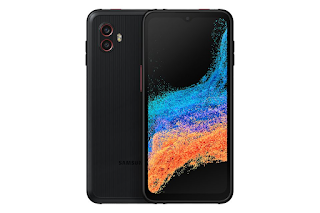
Hello, this is TheTechBoy with an Open Letter To Samsung.  Dear Samsung, You are a great company. You make great devices and are probably wondering why your premium Android devices are not selling as well. The reason is you started removing features.     Samsung, you used to be innovative and fun. You tried out new concepts such as the Galaxy K Zoom which flopped but you still persisted and now have great zoom today. Other concepts such has an in-display fingerprint scanner and Dex caught on and are now on millions of devices.      However, you slipped when you removed the headphone jack from the Not 10 series and the Micro SD card slot from the S21 series. Sales started declining even more as you raced to become more like the iPhone. The S2 now has more features than the S22 Plus (MicroSD and WQHD screen). You made the Ultra the only phone worth getting.      Samsung, what fans is not an Android iPhone, rather they want innovation. They want...

Samsung Releases The A54: Available For Pre Order March 30th

Image
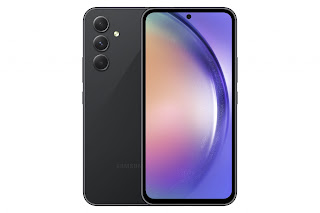
Updated March 28 9:12 AM CST AND March 29 6:23 P.M      Samsung has released the newest mid-range phones. The Galaxy A series is getting a makeover this year to make it look like the S23 series of devices. The phones will be able to buy on April 6th. Specs:     The phone is a 6.4-inch Android phablet that has 5G support. It is running the latest Android 13 with OunUi 5.1. The screen is a 120 HZ AMOLED display. The battery is 5,000 mAh and Samsung advertised that the phone should last two days. The charger is not included in the box. The phone's storage is expandable. Per Sammobile the phone has an Exynos 1300 chip.   Cameras:        The phone has a triple camera setup but one of them is a 5 Megapixel macro sensor.  The rest of the cameras included a 50-megapixel main camera and a 12 Megapixel ultrawide camera. On the form, there is a 32-megapixel camera.      The phone is made out of plastic and should be available t...

What Is a YouTube Premier: Podcast

Image
     A YouTube Premier is a YouTube video that is not live. Let's get it straight from the beginning YouTube Premier's are not live. However, it is more than a static video that you see on YouTube. Let's get into the details. UPDATED 3/25/23 9:27 P.M CST     A YouTube Premiere is a pre-recorded video that has chat features. Users can chat with other people watching the video and can even talk to the creator of the video in the chat. However, your chats will not be responded to by the person in the video because it is not live. The person in the video can send you a chat though.      If you want to mention a user in the chat you just have to send a @and their username. If you are on a pc when you do @username their name will pop up and you can click on them.  On mobile, you have to do @username exactly how their name is so they will get notified by their name highlighted in the chatbot. The video will be bad quality at first than aft...

How To Share Your Office 365 Account On Your Mobile Device Across Devices

Image
Hello, This Is TheTechBoy with a short article.  Step 1:      Go to Office.com to sign into your Microsoft Account. If you have already paid for a subscription, you can download Office 365 on your PC. There is a download version that says Install Apps. Step 2:     Sign into your Microsoft Account after installing and running the downloaded files. The files you created on your mobile device should sync to the account on the PC.          If you did not pay for a subscription but have a free account because you a. have a mobile device with a screen size smaller than 10.1 inches or b. you can just use the web version of Office.com (Office365) The Web Version:     The web version of Office is free and allows you to use OneDtive, Word, Excel, Forms, and PowerPoint online. It will sync between the free mobile application and you can access the web version of Office for free on your desktop/laptop devices. Therefore, you can acces...

How to Import an Image Into Another Image into Samsung Gallery. But Why You (Probably) Shouldn't

Image
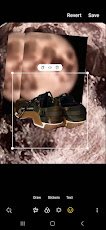
Hello, this is TheTechBoy with  How to import an image into another image into Samsung Gallery.    Step One:     Open the image that you want to edit. Then click the pen icon. This will open the Samsung Gallery image editor. The editor allows you to crop, flip, add stickers, draw, and do so much more to images. Step Two:     Click the smiley face icon and tap the text that says stickers. This will allow you to add stickers to the image. In the bottom left corner and click the icon that looks like a flower. Then click the plus icon that comes up. Then choose the image that you want to import into the first image. Step Three:      Importing the image will allow you to cut it out and even make the image have a highlight around it. If you do not want to do that, then you can just keep clicking next. You will be able to move the image around, flip it around, and zoom in and out of it.     Here is why you (probably) should not do thi...

This Week In TheTechBoy Podcast 3/18/2023: Wow Ai!!!

Image

Meta Launches A Verified Subscription Service

Image
Hello, this is TheTechBoy with a special story.  Per NotTheBee and Meta:     Meta is rolling out paid verified accounts on Facebook and Instagram. Unlike Twitters Verification system, you will need to upload a valid ID and pay 11 dollars and 99 cents per month for web verification and 14 dollars and 99 cents per month to verify through mobile. Two-step verification is also required to become verified. The service is bundled meaning it is one payment for Facebook and Instagram.   Source Meta    The service is called Meta Verified and it looks pretty interesting. Like Google One and the YouTube partner program, creators will be able to directly talk to customer support. Other features include impersonation protection and exclusive Stickers for reels and Stories. You will also be able to support creators with 100 'stars' you get per month. Users must be 18 years of age or older to apply. What do you think of the service? God Bless, Tech Talk To You Later

How To Make Highlighted Image YouTube Thumbnails On Samsung Devices

Image
Hello, this is TheTechBoy with a how-to get YouTube thumbnail cutouts on a Samsung phone.      In some YouTube thumbnails, people cut themselves out and paste them into an image editor. They will also put a highlight around them here is an example. Notice the yellow outline around the people's faces. Source: Brett Cooper                  Step one first you have to take a picture. Then click the pen icon to open the image editor. Then click the circle dotted line to get to the snap to shape. This will make a cutout of an image.     Draw around the shape you want to cut out.  Notice The Dotted Circle      The software will auto-select the shape around it. Then click next. Now you will see the image on a checkered background. Pick a color and drag the slider to make the outline thicker. Then click the three-dot icon to then click save as a copy if you want the original image and the edited i...

101 Subscriber Podcast, Panoramas and Portable Scanners Podcast, Podcast 3/14/23

Image

How To Record From Bluetooth Mics on a Samsung Device: TheTechBoy Spy Article.

Image
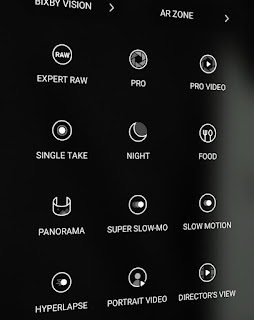
Hello, this is TheTechBoy with a spy article. TheTechBoy Media Is Not Liable If You Do Something Ilegal 1.       Open the Bluetooth menu. Then pair your phone with your Bluetooth device.  This will allow you to use the microphones on the Bluetooth device and not the phone microphones.  2.   Open Samsung voice recorder. Then click the three-dot icon. Then scroll down to use Bluetooth mic when available. Then go back and record.           If You Want To Do This In Video Mode      Swipe over to Samsung's Pro Mode and click Pro Video mode. Then click the button on the bottom that says BT. Click that and it will record via the Bluetooth Mic. This is great for recording yourself if you have a Bluetooth lapel/mic.      In conclusion, these features can be used for awesome content creation or awesome spy missions. In the meantime, 10-4 Tech Talk To You Later and God Bless.     ...

How To Make Photos Look Like This On Your Samung Phone: Samsung Features Series

Image
Hello, this is TheTechBoy with a special tutorial. Get This effect.  On your Phone First, open Samsung Gallery and click the pen icon to edit your photo. Then click the horizontal bar.     This bar can rotate an image horizontally or vertically 45 degrees. If you want your image to look like the one in the image click the horizontal bar and move the slider left or right. If you have enjoyed this Samsung series please comment on this post. More Samsung tips and tricks will be coming soon. God Bless, TheTechBoy 

How To Take Panarama To Samsung Phone

Image
Title Added March 2 2023 Hello, this is TheTechBoy with how to take a panorama with your Samsung phone. What Is a Panarama?  A panorama is a 360 degree image that is stitched together into one long image. How to Take It.     First open your Camera application. Then swipe to the text that says more. Then click the icon that says panarama. Next click the shutter button then move your phone slowly left to right