How To Export Wigle Database To Google Earth On An Android Phnoe
Hello, this is TheTechBoy with a special tutorial.
Recent updates to Android have made the filestystem weird and mad it hard to export the KML files. The remedy to this is using the files application, X-plore.
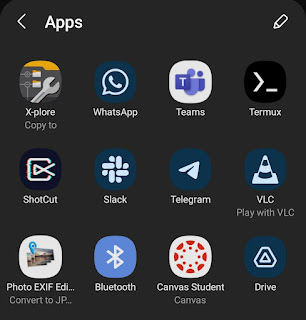
First go to the hamburger menue and go to database. Then click export as a KML. On recent Android phones a share menue will come up.

Second, click the X-Plore icon. This will open the application. Create a new folder and put the files in there. Lastly, wait a few seconds and go to your regular files application. Click the KML file and you can open it in Google Earth.


Comments
Post a Comment